A registration fee is a mandatory preselected cost that will be added to each person in the same booking.
Adding a booking fee is what we call a category-specific setting, which means that you can add it to which categories you want. Follow the steps down below to add a registration fee to a category:
Same booking fee for all persons in the booking
- Log in to Trippus admin and to your event
- Click home in the left hand side menu
- Click on the settings wheel to the rightof the categories name that you want to add the booking fee to.
- Click Edit on the header Registration fee
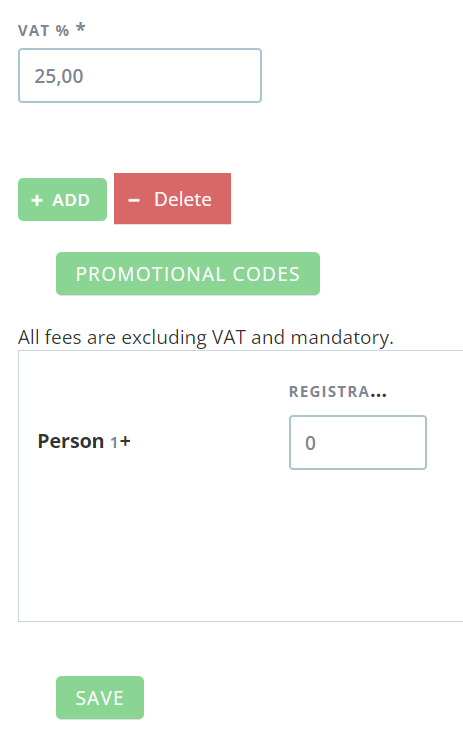
- Enter the VAT in the field VAT
- Enter the registration fee (only numbers) in the field Registration fee for person 1+
Person 1+ means that everyone in the booking pays the same booking fee. - Click Save
Different registration fees for different persons in the reservation
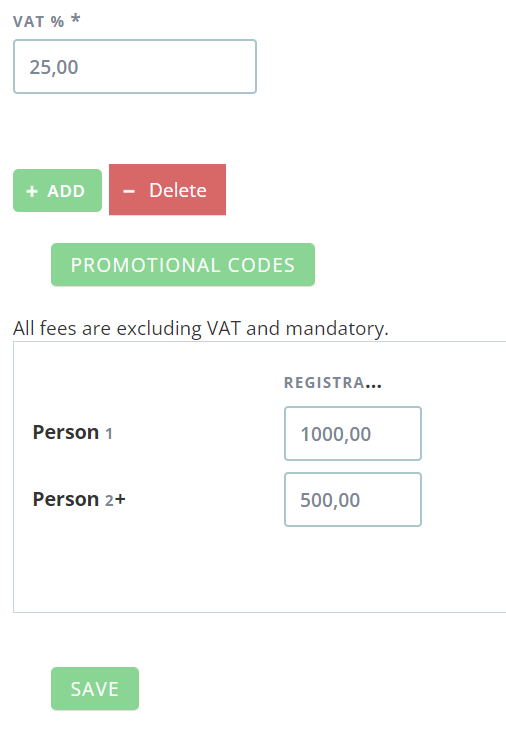
It is possible to have different registration fees for different persons in the same reservation. If you for example want that person 1 (main booker) in the reservation should pay 1000kr in registration fee and that person to and up should pay 500kr in registration fee, you do it like this:
- Fill in 1000 in the field Registration fee for Person 1+
- Click on the green button "Add"
- Klicka på den gröna knappen "Lägg till" to ba able to enter a new Registration fee for person 2+
- Fill in 500 in the field Registration fee for person 2+
- Click save
Comments
0 comments
Article is closed for comments.